
PC iMail2006 - Download
You'll be able to download in few seconds.
Publisher Description
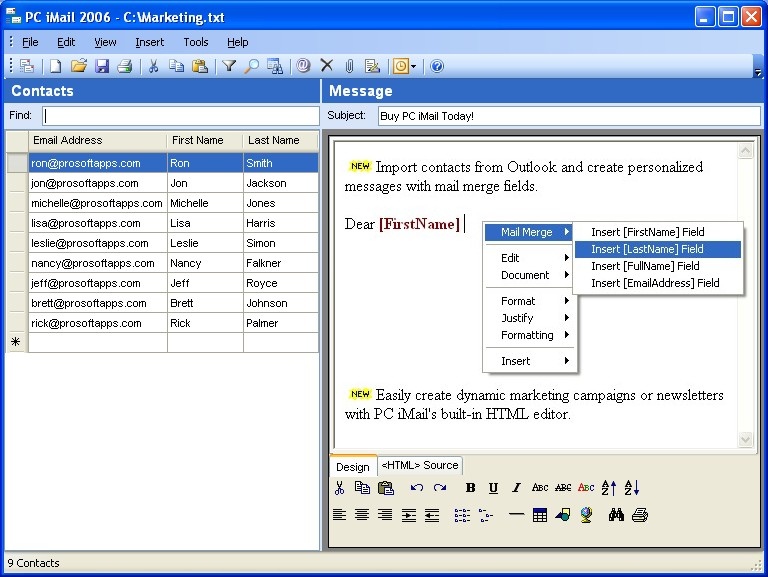
PC iMail helps you send personalized newsletters, press releases, and mail merge campaigns.
Import your contact's email addresses, first names, and last names from Outlook or Exchange Server and then insert this information into each message wherever you want it to appear (e.g. Dear [FirstName] [LastName]).
Set time delays in between each message, to comply with ISP limitations and ensure that your account remains in good standing. And since it sends your message individually to each recipient, you'll never have to worry about your message being rejected from having too many recipients.
Many group mail delivery services will charge on a per-mailing basis, resulting in on-going and costly marketing expenses. PC iMail will pay for itself after only a single mailing, and gives you full control over your message content, style, and delivery.
Registration removes order reminders and allows an unlimited number of messages to be sent. This is a one-time payment - you will never be asked to pay ongoing monthly or maintenance fees, and upgrades are always free.
Looking to lower your per-person licensing cost? Maximize your savings with the site license option below, and pay a fixed rate for an unlimited number of users within your company.
About PC iMail
This Email List Management program is available in English. It was last updated on 29 September, 2026. PC iMail is compatible with the following operating systems: Windows.
The company that develops PC iMail is ProSoft Apps. The latest version released by its developer is 2006.
The download we have available for PC iMail has a file size of 1.0 MB. Just click the green Download button above to start the downloading process. The program is listed on our website since 2007-08-25 and was downloaded 0 times. We have already checked if the download link is safe, however for your own protection we recommend that you scan the downloaded software with your antivirus. Your antivirus may detect the PC iMail as malware if the download link is broken.
How to install PC iMail on your Windows device:
- Click on the Download button on our website. This will start the download from the website of the developer.
- Once the PC iMail is downloaded click on it to start the setup process (assuming you are on a desktop computer).
- When the installation is finished you should be able to see and run the program.
Program Details
System requirements
Download information
Pricing
Version History
version 2006
posted on 2007-08-25
Imports email addresses from Exchange Server, and runs on Windows Vista
Disclaimer
External Download
We do not host PC iMail on our servers. We did not scan it for viruses, adware, spyware or other type of malware. This app is hosted by the software publisher and passed their terms and conditions to be listed there. We recommend caution when installing it.
The external download link for PC iMail is provided to you by apps112.com without any warranties, representations or guarantees of any kind, so access it at your own risk.
If you have questions regarding this particular app contact the publisher directly. For questions about the functionalities of apps112.com contact us.
